
PH33 Withdraw Money – A Guide to Fast & Seamless Reward Claims
PH33 withdraw money is a crucial procedure that helps players convert their winning profits into real cash safely and rapidly. Participating in wagering sessions at the PH33 brand grants members access to a diverse array of modern payment methods. This article provides a comprehensive step-by-step guide alongside essential tips.
Prerequisites Before Executing PH33 Withdraw Money
To ensure your funds transfer request is automatically approved by the system without technical hitches, players must comply with fundamental safety standards. Proper preparation keeps reward processing completely smooth:
- Verify Verified Ownership:The full name on your bank account or e-wallet must match your initial registration details perfectly.
- Fulfill Turnover Requirements:If participating in deposit promotions, players must complete required wagering rollover rounds prior to submitting requests.
- Comply with Transaction Limits:Minimum withdrawal amounts stand at ₱100.00 while maximum thresholds reach ₱50,000.00 per transaction.
- Link Cash-Out Accounts:Connect a valid GCash, Maya, or Bank account to the system before submitting your cash-out request.
Meeting these conditions ensures your PH33 withdraw money experience proceeds without a hitch. Your financial rights remain strictly protected at all times.
Step-by-Step Guide to PH33 Withdraw Money
The system integrates three popular payment channels, allowing players to flexibly select their preferred cash-out option. Below is a detailed walkthrough for each transaction channel.
Claiming Rewards via GCash
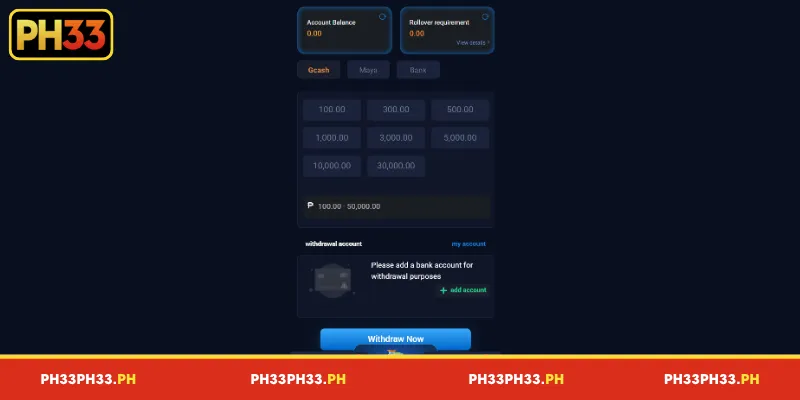
GCash is a widely used e-wallet in the Philippines, offering a convenient way to manage digital payments and receive funds. To use this method, members should first confirm that their GCash account is active and registered under the correct mobile number. The following steps outline the withdrawal process:
- Step 1:Log in to your PH33 account and navigate to the withdrawal section. Select the GCash tab from the available payment methods to open the corresponding transaction form.
- Step 2:Choose a preset amount, such as ₱100, ₱300, ₱500, ₱1,000, ₱3,000, ₱5,000, ₱10,000, or ₱30,000, if these options are available. You may also enter a custom amount within the displayed limits, stated in the provided interface as ₱100–₱50,000.
- Step 3:Check the details under the withdrawal account section. If no account has been linked, click + Add Account and enter the required GCash information, including your registered mobile number.
- Step 4:Review the withdrawal amount and receiving account carefully before proceeding. Once all details are correct, click Withdraw Now to submit the request and check the transaction status for updates.
Using PH33 withdraw money through GCash can simplify the process by directing approved withdrawals to a linked e-wallet. However, the actual processing time depends on the platform’s review procedures and the payment provider. Members should check their transaction history and GCash balance rather than assuming funds will arrive immediately.
PH33 Withdraw Money via Maya
Maya provides another e-wallet option for users who prefer receiving funds through a digital payment account. Before submitting a request, ensure that your Maya account is active and that its registered details match the information required by the withdrawal form. This can help reduce errors caused by incorrect recipient details.
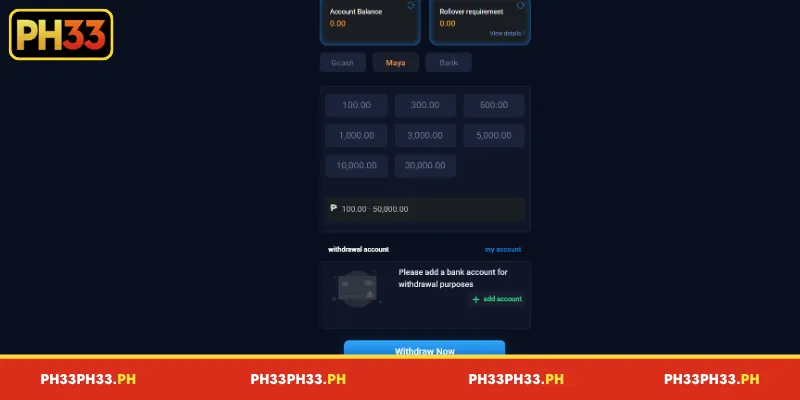
- Step 1:Open the withdrawal page after logging in to PH33. Select the Maya tab from the available payment methods to access the relevant withdrawal options.
- Step 2:Choose one of the preset amounts displayed on the screen or enter a custom value within the platform’s stated minimum and maximum limits. The available amounts may vary, so confirm the current options before submitting your request.
- Step 3:If you have not linked a receiving account, click + Add Account under the withdrawal account section. Enter the required Maya details and check the registered mobile number to ensure that the funds are directed to the intended recipient.
- Step 4:Review the amount, account information, and any displayed transaction conditions. Click Withdraw Now to submit the request, then monitor the withdrawal history for confirmation or further instructions.
Transactions via Bank Channels
Bank withdrawals may suit members who prefer receiving funds directly in a personal bank account instead of an e-wallet. This method requires particular care when entering the recipient’s details because an incorrect account number or account holder name may delay processing. Confirm that bank transfers are supported for your account before proceeding.
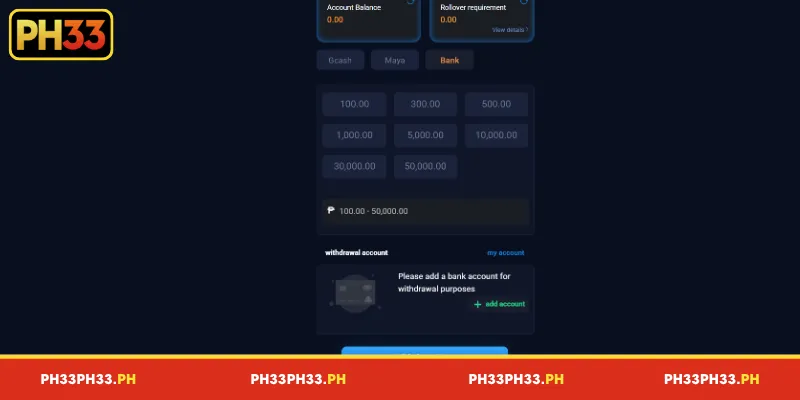
- Step 1:Sign in to PH33, open the withdrawal section, and select the Bank tab from the payment method menu. Review the available bank options and any instructions shown on the page.
- Step 2:Select a preset amount, if available, such as ₱100, ₱300, ₱500, ₱1,000, ₱5,000, ₱10,000, ₱30,000, or ₱50,000. Alternatively, enter a custom amount within the limits displayed by the platform and check whether any additional conditions apply.
- Step 3:Click + Add Account if you need to register a receiving bank account. Enter the bank name, account number, and account holder name exactly as required, then verify every detail against your banking records.
- Step 4:Check the withdrawal amount and recipient information before clicking Withdraw Now. After submitting the request, keep the transaction reference and monitor its status until the transfer is confirmed.
Common Withdrawal Errors at PH33
During active operations, certain members might encounter delayed or rejected withdrawal requests. Below are common causes and effective troubleshooting tips:
- Inputting Amounts Outside Limits:Withdrawing below ₱100.00 or exceeding ₱50,000.00 in a single ticket triggers instant system error alerts.
- Mismatched Receiving Information:Bank or e-wallet account names differing from registered identities get blocked to prevent fraud.
- Unfulfilled Turnover Conditions:Withdrawal tickets experience delays if you fail to meet required wagering rounds tied to active promotional bonuses.
- Banking System Maintenance:Transacting during banking maintenance windows can delay fund arrival compared to estimated schedules.
Mastering these errors helps you remain proactive during PH33 withdraw money. If unexpected issues arise, reach out to 24/7 customer service agents for immediate assistance.
Conclusion
Executing PH33 withdraw money through proper workflows grants players total peace of mind alongside impressive reward payout speeds. The PH33 brand remains dedicated to maintaining a transparent, secure, and reputable gaming environment for all members. Register your account today to experience premier betting sessions and bring home valuable rewards!